Tune List Sorting
A few more organization options.

by Tarun
Creator, tuneUPGRADE
There's a small update today on the tunes list that gives a few extra sort options and makes it easier to access sorting options:
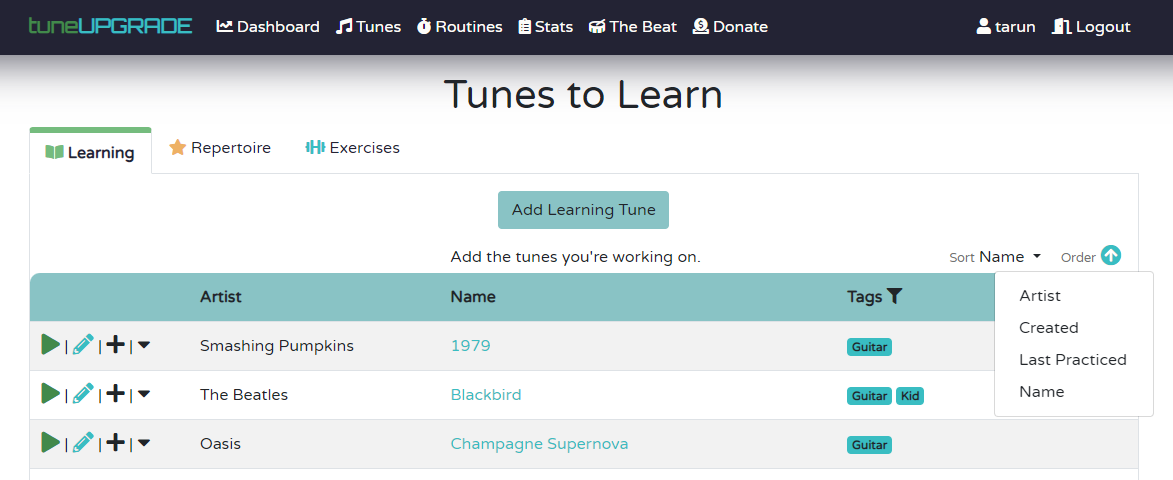
You'll now find a sort dropdown and a clickable order icon above the tunes list on desktop and mobile. This gives you two sort options from before (Artist and Name), but gives you two new ones as well (Created and Last Practiced), letting you sort your lists by when you created a tune, or when you last practiced one.
Sorts are saved on a per-list basis, so if you prefer to see your exercises from newest to oldest, and see which tunes you haven't practiced in a while on the learning list on top, tuneUPGRADE will remember your preference on each tab independently.
Don't forget that you can click a tag as well to filter your lists down!
Happy practicing!
This post is part of the The Beat, a blog by the free music practice tracker tuneUPGRADE. Sign up and start tracking your practice to become a better musician today - totally free!
Related Articles
Jan 2026 Updates: Routine Tweaks and Theory Aids
A slew of new updates as we progress through Jan 2026. I'll keep updating this post if more is released as well.
Dec 2025 Update: UX Updates
Updates to app styling, a faster way to add and search tunes, and a revamped routine list page.

Tune List Experience
Cleaner, more responsive, and with more eye candy.

Quick Practice & Stats
Jump back in faster, see longer result timeframes.

Various UX Improvements
Introducing a new way to add to routines, icons, and fewer clicks!
Autoselection of Spotify Tracks
A quick update to improve user experience when creating new tracks.